
 Soyeb Akhtar
Every student has downloaded at least a dozen apps and used none of them seriously. This guide cuts through the noise. We have tested and ranked the 15 best study apps for students in 2026 — covering note-taking, AI flashcards, distraction blocking, math solving, and time management. Whether you study on a ₹8,000 Android phone or a MacBook, there is a free or affordable tool on this list for you.
Why Study Apps Actually Matter in 2026
Let’s be direct: most students don’t have a time problem. They have a system problem. You sit down to study, you don’t know where to start, your notes are scattered across three notebooks and a WhatsApp chat, and your phone sends you a notification every four minutes.
That is the exact problem the best study apps solve — not by adding more screen time, but by organizing, focusing, and accelerating the work you already have to do.
A 2025 survey by EDUCAUSE found that students who consistently used digital productivity tools reported 34% lower exam-related stress and spent an average of 90 fewer minutes per week re-reading material they hadn’t retained. That’s time you could use to sleep, exercise, or — yes — actually enjoy college.
For Indian students specifically, the challenge is real: competitive exams like JEE, NEET, CA Foundation, UPSC, and board exams demand a level of retention that passive studying simply cannot deliver. The right best apps for students close that gap without requiring expensive coaching.
What Makes a Study App Worth Your Time?
Before we get to the list, here is how we evaluated every app. We looked for four non-negotiable qualities:
- Works on Android: Most Indian students study on Android devices. Any app that is iOS-only or has a poor Android experience was ranked lower.
- Free or genuinely affordable: Premium features must justify their cost. If the free version is crippled, we say so clearly.
- Actually improves retention or focus: Pretty UI is not enough. The app must be grounded in something — spaced repetition, active recall, time-blocking, or distraction elimination.
- Low learning curve: If you need a YouTube tutorial series just to start using it, the app is working against you.
💡 Our Testing Method
Each app in this list was used for a minimum of 30 days across different study scenarios — exam prep, assignment writing, group projects, and daily revision. We prioritised apps that worked equally well in both low-bandwidth and offline conditions.

The 15 Best Study Apps for Students (Reviewed)
1. Notion Freemium
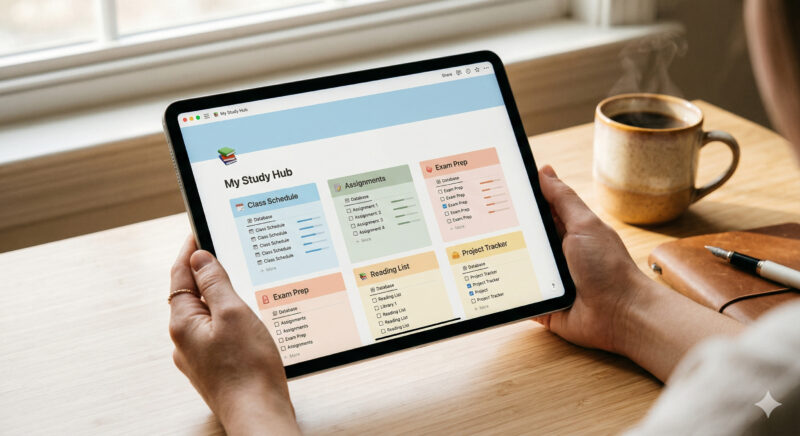
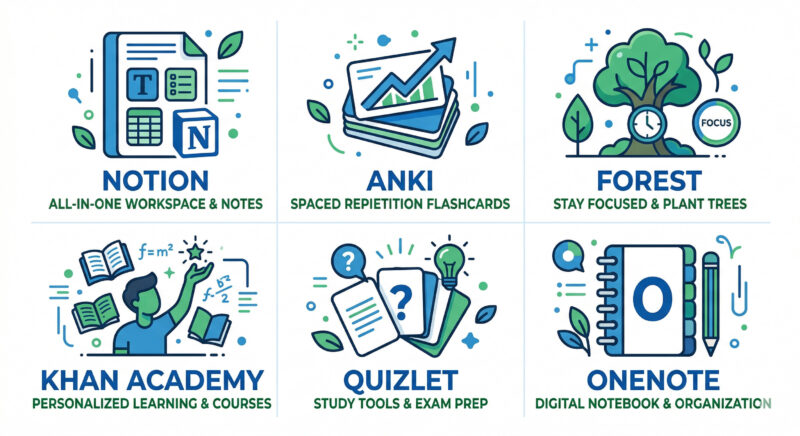
If there is one app every serious student should set up this semester, it is Notion. Think of it as a second brain — part notes app, part task manager, part personal wiki. You can build a full semester dashboard: every subject, every deadline, every formula, all in one place.
Notion’s real power is its flexibility. You can create a simple to-do list or build a relational database that links your lecture notes to assignments to revision schedules. The Notion AI feature (available in the free plan with limited credits) can summarise notes, generate study questions, and fill in tables automatically.
- Create linked databases for subjects, assignments, and revision
- Embed PDFs, YouTube videos, and Google Drive links directly
- Use free student templates from Notion’s template gallery
- Sync across all devices seamlessly
2. Anki Free
Anki is the gold standard for memorisation. It uses spaced repetition — a scientifically-backed method that shows you flashcards at precisely the right moment before you’re about to forget them. Medical students, UPSC aspirants, and language learners have sworn by this app for over a decade.
The interface is not pretty by modern standards. But what it lacks in aesthetics it more than makes up for in effectiveness. AnkiDroid (the Android version) is completely free. There are thousands of pre-made decks for subjects like chemistry, biology, economics, and history — you can import these and start revising the same day.
- Algorithms adjust review frequency based on your performance
- Import and export decks from the community library
- Supports images, audio, and LaTeX formulas in cards
- Syncs with AnkiWeb across all your devices
3. Forest Freemium
Forest turns focus sessions into a game. You plant a virtual tree when you start studying. If you leave the app to check Instagram or YouTube, the tree dies. The longer you stay focused, the bigger your forest grows. You also earn coins that fund real-world tree planting through their partner programme.
For students who genuinely struggle with phone addiction — and that is most of us — Forest is one of the most effective study productivity apps available. The guilt of killing your tree is surprisingly powerful. It works on the same psychological principles as loss aversion.
- Pomodoro-style sessions with customisable timers
- Whitelist specific apps if you need a dictionary or calculator
- Detailed study statistics and weekly summaries
- Team mode for studying with friends — grow a forest together
You might also want to try Learnox’s free Pomodoro Timer — it works directly in your browser with no download required.
4. Quizlet Freemium
Quizlet is the more accessible, social-media-friendly cousin of Anki. Its spaced repetition is less rigorous, but its pre-made card sets are exceptional. For any standard syllabus — CBSE, ICSE, IGCSE, or university modules — there is a very good chance someone has already created flashcard sets you can use immediately.
The new Quizlet Q-Chat (AI tutor) allows you to have a real-time study conversation based on any card set, which is particularly useful when you need to understand why an answer is correct, not just memorise it.
- Multiple study modes: Learn, Test, Match, and Write
- Millions of pre-made decks across all subjects
- AI-generated practice tests based on your weak areas
- Shareable with classmates for group study
5. Khan Academy Free
Khan Academy is a non-profit that has quietly become one of the best free education resources in the world. Its library covers everything from Class 6 Maths to university-level calculus, microeconomics, programming, and even GMAT prep.
What makes it stand out is the quality of explanation. Every concept is broken down into short videos (7–12 minutes) followed by practice problems with immediate, detailed feedback. For Indian students preparing for board exams or entrance tests, the Maths and Science sections are exceptional. Khan Academy also has a dedicated SAT prep section if you’re planning to study abroad.
- Personalised learning dashboard tracks your progress
- Offline download available for videos
- Covers CBSE-aligned syllabus for many subjects
- 100% free, no paywalls, ever
6. Photomath Freemium
Point your camera at any maths problem and Photomath solves it — step by step. This is not about cheating; it is about understanding. The app does not just give you an answer; it walks you through every line of working, so you can see exactly where your logic went wrong.
For Indian students struggling with calculus, trigonometry, or algebra, Photomath is a genuine lifesaver at 11 PM the night before an exam. The word problem solver in the paid version is also remarkably good at parsing complex questions.
7. Microsoft OneNote Free
OneNote is the most underrated free note-taking app for students. It is organised like a physical notebook — you have notebooks, sections (like dividers), and pages. You can type, handwrite (with a stylus), draw diagrams, record audio during lectures, and embed files — all in one free app.
Unlike Notion, OneNote requires zero setup. You open it, create a notebook, and start typing. For students who just want to replace their paper notebook with a digital one, this is the simplest and best option available.
8. Todoist Freemium
If your study problem is less about retention and more about “I forgot that assignment was due today,” Todoist is the app that fixes it. It is the cleanest, most reliable to-do app available. You can organise tasks by project (each subject), add due dates, priority levels, and even recurring tasks for daily revision.
The natural language input is Todoist’s killer feature. Type “Submit Lab Report every Monday at 9am” and it creates a recurring task automatically. This kind of smart input saves time and removes friction — which means you actually use it.
9. Grammarly Freemium
Every student who writes assignments, research papers, or emails to professors should have Grammarly installed. The free version catches grammar errors, spelling mistakes, and basic punctuation issues in real time as you type — across Gmail, Google Docs, and most websites.
The premium version adds style suggestions, tone detection, and a plagiarism checker against 16 billion web pages. If your assignments are graded on language quality, the premium plan can pay for itself in better marks alone. Grammarly also integrates directly with Microsoft Word.
10. NotebookLM Free
NotebookLM is Google’s AI-powered research assistant, and it is one of the most impressive free tools released in recent memory. You upload your lecture slides, textbook PDFs, or research papers, and it becomes your personal expert on that material. Ask it any question — it will answer using only your uploaded sources, with citations.
The Audio Overview feature generates a realistic podcast-style conversation summarising your study material — genuinely useful for revision during commutes. For any student writing a thesis, literature review, or research paper, NotebookLM is now an essential tool.
- Upload PDFs, slides, Google Docs, YouTube videos
- Ask questions and get cited answers from your own material
- Generate study guides, FAQs, and timelines automatically
- Create AI audio summaries of any topic
11. Google Calendar Free
It seems too simple to be on this list. But every student who says “I don’t have time” is usually someone who has never properly mapped their week. Google Calendar forces you to be honest — when you block 7–9 PM for Chemistry revision and you’re watching reels instead, the calendar doesn’t lie.
Use it to block study sessions like appointments. Set reminders 30 minutes before each session. Colour-code subjects. Share it with a study partner for accountability. Combined with a proper study timetable, Google Calendar becomes a powerful habit anchor.
12. Brain.fm Paid
Brain.fm uses AI-generated music specifically designed to promote focus. It is not like playing lo-fi hip-hop in the background — the audio is engineered with neural phase locking technology to bring your brain into a focus state faster. Many students who struggle with silence or get distracted by lyric-heavy music find this to be genuinely useful.
The free trial is generous. If you find it helpful, the annual plan works out to less than ₹300 a month — cheaper than one coffee a week.
13. Duolingo Freemium
For students learning English, German, French, Spanish, or Japanese — whether for exams or career advancement — Duolingo is the most effective free language app available. Its gamified streak system makes 10–15 minutes of daily practice feel like a game rather than a chore.
The science behind Duolingo is legitimate: it uses spaced repetition, adaptive learning, and retrieval practice. It won’t replace immersion, but for exam preparation (IELTS, TOEFL, DELF) and building vocabulary, it is hard to beat for the price.
14. Obsidian Free
Obsidian is for students who want to build a genuine “second brain.” Unlike Notion’s database approach, Obsidian uses bidirectional links between notes — so when you write a note on “Cell Division,” you can see every other note that mentions it. Over a semester, your notes start forming an interconnected knowledge graph.
The core app is free and works entirely offline. All your notes are stored as plain text on your device — nothing is locked in a proprietary format. Power users add community plugins for spaced repetition, Pomodoro timers, and Zotero integration.
15. Learnox Study Planner Free
Our own Learnox Study Planner is a browser-based tool designed specifically for Indian students. No download required. Set your subjects, add study sessions for the week, and get a clean visual overview of your schedule. Pair it with the Pomodoro Timer for a complete free focus system.
Quick Comparison Table
Here is a side-by-side overview of all 15 apps to help you choose based on your needs and budget.
| App | Best For | Android | Free? | Offline? |
|---|---|---|---|---|
| Notion | All-in-one organisation | ✓ | ✓ Free plan | ✓ |
| Anki | Spaced repetition | ✓ | ✓ Free Android | ✓ |
| Forest | Focus / distraction block | ✓ | ✓ Basic | ✓ |
| Quizlet | Flashcards & quizzes | ✓ | ✓ Free plan | ✗ Limited |
| Khan Academy | Concept learning | ✓ | ✓ Always free | ✓ Videos |
| Photomath | Maths problem solving | ✓ | ✓ Basic | ✓ |
| Microsoft OneNote | Digital notes | ✓ | ✓ Free | ✓ |
| Todoist | Task management | ✓ | ✓ Free plan | ✓ |
| Grammarly | Academic writing | ✓ | ✓ Free plan | ✗ |
| NotebookLM | AI research assistant | ✓ Browser | ✓ Free | ✗ |
| Google Calendar | Schedule planning | ✓ | ✓ Free | ✓ |
| Brain.fm | Focus music | ✓ | ✗ Paid | ✗ |
| Duolingo | Language learning | ✓ | ✓ Free | ✓ Limited |
| Obsidian | Linked note-taking | ✓ | ✓ Free | ✓ Fully offline |
| Learnox Study Planner | Weekly planning | ✓ Browser | ✓ Free | ✗ |
Expert Tips: Getting the Most Out of Study Apps
🎓 Expert Recommendations
- Start with one app per category. Do not use both Anki and Quizlet simultaneously. Pick one flashcard tool, master it, then decide if you need something different.
- Use the “Sunday Setup” habit. Every Sunday, spend 20 minutes updating Notion, reviewing Todoist tasks, and loading new Anki cards for the week ahead. This 20-minute investment saves hours of confusion during the week.
- Pair apps intentionally. The best system looks like this: Notion (notes + organisation) → Anki (flashcards from your notes) → Forest (focused review sessions) → Todoist (deadline tracking).
- Use NotebookLM for revision, not just research. Upload your own handwritten or typed notes as PDFs and let it generate practice questions. It is the fastest way to convert passive notes into active revision material.
- Track your study time honestly. Use Forest’s weekly stats or a simple journal. Students often overestimate how much they study by 30–40%. Honest tracking changes behaviour.
Looking for proven study methods to pair with these tools? Read our guide on 12 Study Techniques for Students That Actually Work — it covers active recall, spaced repetition, and the Feynman technique with practical examples.
Common Mistakes Students Make with Study Apps
⚠️ Avoid These Mistakes
- Downloading 10 apps and using 0 seriously. App hopping is a form of procrastination. Choose 3–4 apps and commit to them for at least 30 days before evaluating.
- Spending more time organising Notion than actually studying. This is called “productivity theatre.” Your Notion dashboard does not earn marks — your revision does. Keep setup minimal and functional.
- Using Anki as a passive reading tool. Anki only works if you are actively recalling answers before flipping the card. Students who flip too quickly see almost no benefit.
- Treating Forest like an achievement badge. Completing a Forest session is not the goal. Completing the actual study task within that session is. Do not celebrate the timer; celebrate the work done.
- Ignoring the free version of great apps. Grammarly’s free plan, Notion’s free plan, and AnkiDroid are all genuinely excellent. You do not need to pay to get started. Upgrade only when you hit a real limitation.

One of the most common problems we hear from students is the inability to maintain focus. If apps alone are not helping, you may need to work on your underlying habits first. Read our guide on How to Focus on Studies: 15 Proven Tips That Actually Work for a deeper look at the psychology of student concentration.
Building Your Ideal Study App System
You do not need all 15 apps. Most students need exactly four: one for organisation, one for active recall, one for focus, and one for scheduling. Here is a simple decision guide:
For School Students (Class 8–12)
- Notion (subject notes and assignment tracker)
- Anki or Quizlet (formula and date flashcards)
- Forest (focus timer during study hours)
- Khan Academy (concept videos for subjects you find hard)
For Competitive Exam Aspirants (JEE / NEET / UPSC)
- Anki (non-negotiable — build your own decks from NCERT)
- Notion (syllabus tracker and weak-topic list)
- Todoist (daily task lists and mock test scheduling)
- Forest + Learnox Pomodoro Timer (long study sessions)
For College / University Students
- Notion (semester dashboard, assignment tracker, project workspace)
- NotebookLM (upload slides, generate practice questions)
- Grammarly (all written assignments)
- Todoist (deadline management)
📎 More from Learnox

Frequently Asked Questions
Conclusion: Start Small, Stay Consistent
There is no magic app that will make studying effortless. But the best study apps do something genuinely valuable — they remove the friction between you and the work you already need to do.
Start with just two apps from this list. Spend two weeks actually using them before downloading anything else. If you’re a school student, try Anki + Forest. If you’re a college student, start with Notion + Todoist. If you’re a competitive exam aspirant, Anki + Google Calendar is your foundation.
The students who improve their grades are not the ones who find the perfect app — they are the ones who use a decent app consistently over months. Build the habit first. The results follow.
Ready to Study Smarter?
Explore Learnox’s free tools built specifically for Indian students — no download, no login required.


Plz help me with my studies or make a study guide for because the are upcoming exams and I can’t concentrate but I think ur apps will work