
 Soyeb Akhtar
Why Choosing the Right Note Taking App Actually Matters
Here’s something most students don’t realize until exam season hits: bad notes are worse than no notes. If your notes are all over the place — some in a notebook, some in WhatsApp “Saved Messages,” some in random Google Docs files — you’re not saving time. You’re wasting it.
A good note taking app fixes this completely. It gives your study material a home. You can search it, organize it, revise from it, and access it from any device. And the best part? You don’t need to spend anything. The best free note taking apps for students in 2026 are genuinely powerful — some are better than paid tools.
Think about Priya, a 3rd-year engineering student from Chennai. She used to take notes in five different apps — WhatsApp, Google Docs, a random notes app, sticky notes on her laptop, and a physical diary. Come exam time, she’d spend 2 hours just finding her notes. The moment she switched everything to Notion, she cut that time to 10 minutes and scored better in her internals — not because she studied more, but because she studied smarter.
That’s the power of picking the right tool. And in this guide on the best free note taking apps for students, I’ll help you find yours.

What to Look for in a Free Note Taking App for Students
Not all note apps are built the same. Before I get into the reviews, here’s what you should judge any app on — especially if you’re a student in India with limited data, storage, or a mid-range Android phone:
✅ Free Plan Generosity
Some “free” apps lock key features behind a paywall very quickly. Look for apps where the free plan is genuinely usable — not a 7-day trial dressed up as free.
✅ Offline Access
Internet isn’t always available — especially in hostel rooms, during travel, or during power cuts. The best apps still let you write and read notes without data.
✅ Cross-Device Sync
You need your notes to be available on your phone, your laptop, and maybe a tablet. Free sync is a must. Some apps charge for this — avoid them.
✅ Search Functionality
The bigger your notes library grows, the more important search becomes. An app without fast, reliable search is just a digital junk drawer.
✅ Organization Features
Folders, tags, notebooks, colors — whichever system the app uses, it should let you organize by subject, chapter, or date easily.
✅ Works Well on Mobile
Most Indian students study on phones more than laptops. The best apps to take notes on phone for students need a clean, fast mobile interface — not a watered-down mobile version of a desktop tool.
With these filters in mind, here are the 10 apps that genuinely passed the test.
Top 10 Best Free Note Taking Apps for Students – Honest Reviews 2026
These are real reviews — not copied from press releases. I’ve pulled together feedback from actual students, tested the free tiers myself, and ranked them on what matters to Indian students specifically.
1. Notion – Best Free Note Taking App for Serious Students
⭐ Editor’s #1 Pick
100% Free
If there’s one app that has genuinely changed how students organize their academic life, it’s Notion. It’s not just a note taking app — it’s a full-on second brain. You can create pages for each subject, link notes together, add tables, embed images, create revision checklists, and even build your own study planner.
The free plan is genuinely incredible. You get unlimited pages, blocks, and collaborative workspaces. Students with a college email also get the Notion Education plan free — which is otherwise $16/month. That alone makes Notion one of the best free note taking apps for students in 2026.
Real Student Example: Karan, a UPSC aspirant from Lucknow, uses Notion to organize his entire syllabus. Each subject has its own page, each chapter has sub-pages, and he uses a “Revision Tracker” database to mark topics as Done, In Progress, or Not Started. He told me: “I wish I had found Notion in Class 11 itself. My notes are cleaner than any printed material I’ve ever bought.”
Pros
- Incredibly powerful free plan
- Works like a complete second brain
- Database, table, and calendar views
- Free Education plan with college email
- Available on all platforms
- Great for group study and collaboration
Cons
- Learning curve for beginners
- Slow to load on low-RAM phones
- Offline mode is limited (not full offline)
Best For: Engineering, medical, UPSC, CA students — anyone with complex, subject-heavy study material.
2. Google Keep – Best Quick-Note App for Phone
📱 Best on Mobile
100% Free
Google Keep is what you use when you need to capture a thought right now, in 5 seconds. It’s fast, colorful, and syncs instantly with your Google account. If you already use Gmail or Google Drive, Keep fits into your life without any friction.
As one of the top best apps to take notes on phone for students, Google Keep lets you create color-coded notes, add checklists, set location-based or time-based reminders, and even record voice notes. It’s pre-installed on most Android phones in India — which means zero setup needed.
Real Student Example: Sneha from Nashik uses Google Keep exclusively during lectures. “I just type bullet points as the professor talks. After class, I copy them into Notion and expand them. Google Keep is my capture tool.” That two-app workflow is actually used by thousands of Indian students.
Pros
- Lightning-fast — opens in under 1 second
- Pre-installed on most Android phones
- Voice notes and image notes supported
- Color-coded labels for organization
- Fully offline with Google sync
Cons
- No folders or nested organization
- Not ideal for long, detailed notes
- Limited formatting options
Best For: Quick captures, reminders, short revision notes, to-do lists.
3. Microsoft OneNote – Best for Handwriting & Diagrams
🖊️ Best for Handwriting
Free with Microsoft Account
OneNote is Microsoft’s answer to a physical notebook — and it’s remarkably close. The interface uses a notebook-tab-page structure that feels instantly familiar. You can type anywhere on the page (literally click anywhere and start typing), draw with your finger or stylus, insert images, and organize everything into sections.
For students who sketch diagrams — chemistry structures, physics circuits, biology drawings — OneNote’s free drawing tool is unbeatable in the best free note taking apps for students category. The free tier is genuinely complete. You just need a free Microsoft account (which every student already has through their college email).
Pros
- Free-form canvas — type anywhere
- Excellent drawing and handwriting support
- Notebook structure great for subjects
- Full offline access
- Works perfectly on Windows devices
Cons
- Android app has occasional sync delays
- Slightly heavy app (uses more storage)
- Limited on iOS compared to Windows
Best For: Science students, diagram-heavy subjects, students with stylus-enabled tablets.
4. Obsidian – Best for Building a Knowledge Map
🔒 100% Offline
Free
Obsidian is the app that serious, deep-thinking students swear by — and it’s completely free for personal use. Unlike regular note apps, Obsidian saves all your notes as plain text files on your device. No cloud subscription needed. No privacy concerns. Your notes are 100% yours.
The standout feature is linked notes — you can connect notes from different subjects like a knowledge graph. For example, if you’re studying about the Indian Constitution for UPSC, you can link your notes on Fundamental Rights directly to your notes on the Supreme Court — and visualize how everything connects. It’s genuinely revolutionary for competitive exam prep.
Pros
- Completely offline — no data usage
- Linked notes — build a knowledge graph
- Notes stored as plain text (never locked in)
- Highly customizable with plugins
- Zero subscription fees — truly free
Cons
- Steep learning curve — not beginner-friendly
- Sync between devices requires manual setup
- Mobile app is less polished than desktop
Best For: UPSC, law, history, and research students who think in interconnected concepts.
5. Evernote (Free Tier) – The OG Note Taking App
🏛️ Most Established
Free (Limited)
Evernote was the original “best free note taking app for students” for nearly a decade. It’s still a solid choice, though its free plan has become more restricted over the years. You’re now limited to 1 notebook and 50 notes on the free tier — which is enough for one subject or one exam cycle.
The Web Clipper browser extension is still one of the best tools for saving articles and web pages into your notes. If you do a lot of research-based studying — journalism, economics, political science — Evernote’s web clipping is hard to beat.
Pros
- Excellent Web Clipper extension
- Clean, simple interface
- Document scanning with phone camera
- Good search — even inside images
Cons
- Free plan is now very limited (1 notebook)
- 50-note cap is frustrating for active students
- Paid plans expensive compared to alternatives
Best For: Research-heavy students, saving articles, one-subject focused use.
6. Zoho Notebook – Beautifully Designed & Fully Free
100% Free
📱 Great on Mobile
Zoho Notebook is India’s own answer to Evernote — and it’s 100% free with no annoying limits. From Zoho, an Indian SaaS company from Chennai, this app lets you create beautiful notebooks with different “card” types — text, audio, checklist, sketch, and photo cards.
The interface is stunning. If you care about how your notes look (and honestly, it helps you stay motivated to use the app), Zoho Notebook is one of the most visually polished best free note taking apps for students on this entire list. Full cloud sync, full offline access, zero cost.
Pros
- Completely free — no hidden limits
- Beautiful card-based design
- Indian company — good regional support
- Multiple card types (audio, sketch, text)
- Offline + cloud sync both available
Cons
- Less popular than Notion or Keep — fewer tutorials
- No desktop app for Windows
- Not ideal for complex database-style notes
Best For: Students who want a beautiful, simple, fully free note app without any limits.
7. Standard Notes – Best for Privacy-Conscious Students
🔐 End-to-End Encrypted
Free
If you’re someone who cares about where your notes go — and you should be — Standard Notes is the most privacy-respecting option on this entire list. Every note is end-to-end encrypted, meaning even Standard Notes the company cannot read your notes. It’s fully open-source and backed by a passionate developer community.
The free plan gives you a clean, distraction-free writing experience with unlimited notes, offline access, and sync across all devices. It’s not flashy, but it’s incredibly reliable. For students who journal, write essays, or simply don’t want their study notes on a Big Tech server, Standard Notes is a top pick.
Pros
- End-to-end encrypted — maximum privacy
- Open-source and transparent
- Unlimited notes on free plan
- Works on every platform
- Distraction-free writing environment
Cons
- Very basic formatting on free plan
- No drawing or image embedding in free tier
- Not ideal for visual learners
Best For: Students who value data privacy, writers, journalers.
8. Simplenote – The Fastest, Lightest Note App
100% Free
📱 Ultra-Lightweight
Simplenote does exactly what the name says — simple notes, done fast. If you have a basic Android phone with limited RAM or storage, Simplenote is the best option because it barely takes any space and opens instantly. It’s made by Automatic (the company behind WordPress), so it’s reliable and regularly updated.
The entire app is text-only — no images, no tables, no drawings. But what it does, it does brilliantly: instant sync, version history (you can see older versions of your notes), and a focus mode for distraction-free writing. For students who write long revision notes, that version history alone is a lifesaver.
Pros
- Ultra-lightweight — works on any phone
- Version history — recover deleted notes
- 100% free, no paid tier at all
- Fast sync across all devices
Cons
- Text-only — no images or tables
- No folder system (tag-based only)
- Too simple for complex study use cases
Best For: Students with basic phones, quick text notes, essay drafts.
9. Joplin – Best Open-Source Evernote Alternative
🔓 Open Source
Free
Joplin is a powerful, open-source note taking app that looks and feels like a premium tool — but costs absolutely nothing. You get notebooks, sub-notebooks, tags, markdown formatting, to-do lists, and even end-to-end encryption. It supports syncing via Dropbox, Google Drive, OneDrive, or your own server.
For students who want the structure and power of Evernote without the price tag or restrictions, Joplin is the answer. It’s especially popular among students in engineering and computer science who appreciate the open-source philosophy and markdown-based writing.
Pros
- Full-featured — notebooks, tags, to-dos
- Markdown support — great for developers
- Sync via your own cloud (Dropbox, GDrive)
- Open source — no vendor lock-in
Cons
- Interface is not beginner-friendly
- Mobile app needs improvement
- Markdown knowledge helpful but not always intuitive
Best For: CS/IT students, tech-savvy learners, students who want full control over their data.
10. Apple Notes – Best for iPhone/iPad Students
Free (Pre-installed)
🍎 iOS Only
If you use an iPhone or iPad, you already have one of the best free note taking apps for students sitting in your app drawer. Apple Notes has grown enormously over the last few updates — it now supports rich text, tables, checklists, sketches, scanned documents, and even collaboration.
The iCloud sync is seamless and instant. The search function is fast and even recognizes text within handwritten notes. And since it’s built by Apple, it integrates perfectly with Siri — you can say “Hey Siri, add a note: revise Chapter 5 tonight” and it just works.
Pros
- Pre-installed — zero setup
- Seamless iCloud sync on Apple devices
- Fast, reliable, and deeply integrated
- Handwriting recognition in search
- Siri shortcuts support
Cons
- Apple ecosystem only — no Android/Windows
- Not useful if you also study on a non-Apple laptop
Best For: Students who exclusively use Apple devices (iPhone, iPad, Mac).

Quick Comparison – Best Free Note Taking Apps for Students 2026
Here’s your cheat sheet. Everything at a glance from this best free note taking apps for students guide:
| App | Free Plan | Offline | Mobile | Best For | Rating |
|---|---|---|---|---|---|
| Notion | Unlimited pages | Partial | ✅ Android & iOS | Complex study org. | 4.7 ⭐ |
| Google Keep | Unlimited notes | ✅ Yes | ✅ Pre-installed | Quick phone notes | 4.6 ⭐ |
| OneNote | Full-featured | ✅ Yes | ✅ Both | Handwriting, diagrams | 4.4 ⭐ |
| Obsidian | Full-featured | ✅ Fully | ✅ Both | Knowledge maps | 4.4 ⭐ |
| Evernote | 1 notebook, 50 notes | Limited | ✅ Both | Web clipping | 4.1 ⭐ |
| Zoho Notebook | Unlimited | ✅ Yes | ✅ Both | Beautiful design | 4.2 ⭐ |
| Standard Notes | Unlimited | ✅ Fully | ✅ Both | Privacy-first | 4.0 ⭐ |
| Simplenote | Unlimited | ✅ Yes | ✅ Both | Basic phones, text | 4.1 ⭐ |
| Joplin | Full-featured | ✅ Fully | ✅ Both | CS/tech students | 4.0 ⭐ |
| Apple Notes | Full-featured | ✅ Yes | iOS only | iPhone/iPad users | 4.3 ⭐ |
Which App Should YOU Use? – Decide in 60 Seconds
Still unsure? Use this decision guide from our best free note taking apps for students review to find your match immediately:
- 📚 JEE / NEET / UPSC prep with lots of subjects: → Notion (best for heavy, organized studying)
- 📱 You mostly study on your Android phone: → Google Keep + Notion combo
- ✏️ You draw diagrams and prefer handwriting: → Microsoft OneNote
- 🔗 You like connecting ideas between subjects: → Obsidian
- 🔒 You don’t want your notes on any server: → Standard Notes or Obsidian
- 🍎 You’re on iPhone or iPad: → Apple Notes (it’s already there)
- 📰 You save a lot of articles and web pages: → Evernote (Web Clipper)
- 📱 Your phone has low RAM / storage: → Simplenote
- 🇮🇳 You want a beautiful all-free Indian alternative: → Zoho Notebook
- 💻 You’re a CS student who loves open source: → Joplin or Obsidian
Whichever app you pick from this best free note taking apps for students list, the most important thing is consistency. Using one app daily beats jumping between five apps weekly.
Also, if you haven’t set up a proper study space yet, check out our guide on How to Create a Study Space in a Small Room — because even the best note taking app works better in the right environment.
Expert Tips: How to Take Better Notes Digitally
Having the right app is only half the story. Here’s how to actually use it effectively — tips that most students never bother to follow:
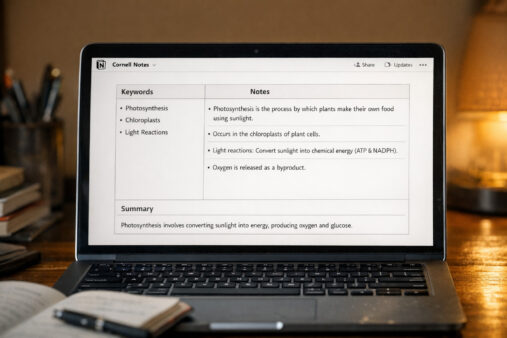
💡 Tip #1: Use the Cornell Method DigitallySplit your note page into three sections — a narrow left column for keywords/questions, a wide right column for main notes, and a summary section at the bottom. You can set this up as a Notion template or OneNote layout. It’s one of the most effective revision structures ever created.
💡 Tip #2: Review Your Notes Within 24 HoursResearch from the American Psychological Association confirms that reviewing notes within 24 hours of writing them dramatically increases retention. Block 15 minutes each evening for a quick digital note review — it takes less time than one Instagram reel.
💡 Tip #3: Tag Everything ConsistentlyWhether you use Notion, Keep, or Joplin — create a tagging system from day one. Use tags like #chapter1, #important, #exam, #doubt. When revision season arrives, you’ll thank yourself for this.
💡 Tip #4: Don’t Transcribe — SummarizeThe most common mistake is copying down everything the teacher says. Instead, write your own understanding of the concept in 2–3 lines. If you can’t explain it simply, you haven’t understood it yet. This approach takes practice but makes your notes 10x more useful during revision.
💡 Tip #5: One App, One PurposeIf you use two apps, keep the roles clear. For example: Google Keep for quick captures during class → Notion for expanding and organizing those notes at home. Don’t let the same content live in two places — it creates confusion and wastes revision time.
Want to take your productivity even further? Our Best Time Management Tips for Students guide pairs perfectly with any of these apps.
Common Mistakes Students Make with Note Taking Apps
These are real mistakes I see Indian students make — and they quietly kill your study productivity. Avoid them:
❌ Mistake #1: Switching Apps Every MonthThis is the biggest one. You try Notion for a week, then switch to Evernote, then to Keep, then back to a physical notebook. Every time you switch, you lose your organized history and have to start over. Pick one app, commit to it for at least 3 months before judging it.
❌ Mistake #2: Not Naming Notes Properly“New Note (47)” is not a name. Get into the habit of naming every note immediately — “Physics – Chapter 3 – Laws of Motion” is findable in 2 seconds. “Untitled” is lost forever.
❌ Mistake #3: Never Reviewing Old NotesNotes are only useful if you go back to them. Treat your notes app like a textbook, not a dustbin. Schedule a weekly 20-minute review session — check our tips on studying for long hours to build a sustainable review habit.
❌ Mistake #4: Using Too Many Formatting OptionsColor coding every single line, adding emojis to every heading, using 6 different font sizes — this is visual chaos disguised as organization. Keep it minimal: one or two accent colors, simple headers, clean bullet points. Less formatting = more focus on content.
❌ Mistake #5: Not Backing Up NotesCloud apps can lose data, accounts can get locked, and phones can be stolen. Export your notes as PDFs at the end of every semester and store them on Google Drive or email them to yourself. It takes 5 minutes. Losing a semester’s worth of notes takes weeks to recover from emotionally and academically.

Build Your Complete Study System with Learnox
Your note taking app is just one part of a smart student setup. Pair it with these guides from Learnox to build a full system that actually works:
For deeper reading on digital study science, the APA’s guide on effective learning techniques is one of the most research-backed resources available — and it’s completely free.
Frequently Asked Questions – Best Free Note Taking Apps for Students
Which is the best free note taking app for students in India?
Notion is the best overall free note taking app for students in India for its unlimited pages, powerful organization, and free Education plan. For quick mobile notes, Google Keep is unbeatable. Together, they cover almost every study scenario a student faces.
Is Notion really free for students?
Yes, Notion has a completely free plan for individual use. Students with a valid college email also qualify for the Notion Education plan at no cost — which unlocks extra features like unlimited AI usage and file uploads. Visit notion.so/students to apply.
Which note taking app works best on Android phones for students?
Google Keep, Notion, and Microsoft OneNote are the three best apps to take notes on phone for students using Android. Google Keep is the fastest, Notion is the most powerful, and OneNote is best if you draw diagrams. All three are free and sync across devices.
Can I use note taking apps without internet?
Yes. Microsoft OneNote, Obsidian, Standard Notes, and Simplenote all work fully offline. Google Keep and Notion also allow offline access to notes that were previously synced — they update the next time you connect to the internet.
What is the best note taking app for medical or engineering students?
Notion is the top recommendation for medical and engineering students because it supports databases, linked pages, tables, and complex formatting — ideal for subjects with huge syllabi. Obsidian is also excellent for building knowledge maps between interconnected concepts like anatomy systems or engineering theory modules.
Conclusion – Final Verdict on the Best Free Note Taking Apps for Students
Let me be direct with you. You don’t need a paid app. You don’t need to spend a single rupee on note taking software in 2026. The best free note taking apps for students listed here are genuinely world-class — and the free plans are more than enough for any Indian student.
Here’s my final recommendation in three lines:
- Best overall: Notion — for any student who needs serious, organized, long-term notes
- Best on mobile: Google Keep — for quick in-class or on-the-go notes
- Best offline pick: Obsidian or OneNote — for zero internet dependency
The truth is, the best app is the one you’ll actually use every single day. Start with one, build a habit, and watch your revision quality improve dramatically over the next few weeks.
This wraps up our complete best free note taking apps for students guide. If this helped you, share it with a classmate who’s still saving notes in WhatsApp “Saved Messages.” They need this.
Also check out our companion guide on the 10 Best Study Apps for Students — because great notes are just the beginning of a smart student toolkit.
Ready to Study Smarter, Not Harder? 🚀
Explore all our free guides on study tools, productivity hacks, and budget setups — made specifically for Indian students.


1 thought on “10 Best Free Note Taking Apps for Students 2026”